
-
Your keynote speaker is dialing in from London. The panel moderator is on-site at the Riyadh Front Conference Centre. The slide deck arrived thirty minutes ago in the wrong aspect ratio. This scenario plays out at nearly every second hybrid corporate conference in Saudi Arabia. The gap between a polished event and visible chaos comes down to one document: a structured remote speaker checklist for hybrid conference execution.
Whether you are organizing a product launch from KAFD, a seminar series across Jeddah and Dammam, or a board meeting with C-suite executives joining remotely, the stakes are identical. Your remote presenters need the same operational rigor as your in-room production.
This playbook gives event planners, communications teams, and corporate organizers in KSA a step-by-step process to manage every remote speaker from first briefing through final applause.
What Should a Remote Speaker Checklist for Hybrid Conference Cover?
A complete checklist must address five domains: speaker onboarding, technical validation, content collection, rehearsal scheduling, and day-of contingency. Missing any single domain creates a failure point that audiences both in-room and online will notice immediately.
Speaker Onboarding and First Contact
Start outreach no later than four weeks before the event. Send a speaker briefing template that covers the event theme, audience profile, session format, and time zone details. For KSA events bridging Riyadh, Jeddah, and international cities, confirm Arabian Standard Time explicitly. Never assume speakers know the offset.
Include a named point of contact. Remote presenters need a single person—not a shared inbox—to resolve questions fast. This first step in speaker onboarding sets the tone for the entire engagement.
Slide Collection and Presentation Format
Request final slides 10 business days before the event. Specify your presentation format: widescreen 16:9, branded template or open design, maximum file size, and font embedding requirements. Manage slide collection via a shared folder, not email attachments.










If your event uses LED walls at venues like the Hyatt Regency Riyadh Olaya or the Crowne Plaza Riyadh RDC, confirm resolution requirements with your AV partner before sending the slide template to speakers.
Content Approvals and Speaker Release Forms
Every corporate event requires content approvals before a slide goes live. Build a 48-hour review window into your timeline for legal and brand compliance. Pair this with speaker release forms granting recording, streaming, and post-event distribution rights. In KSA, ensure Arabic and English versions are available for local speakers and government representatives.
How Do You Run a Virtual Speaker Rehearsal That Prevents Day-of Failures?
Schedule a mandatory technical rehearsal 48 to 72 hours before the event, never the morning of. This single session catches the vast majority of audio, video, and connectivity issues before they reach your live audience.
Structuring the Rehearsal Session
A proper virtual speaker rehearsal should run 20 to 30 minutes per speaker. Walk through the full flow: platform login, slide sharing, camera and mic confirmation, talkback channel test, and Q&A mechanics. Record the rehearsal so your production team can reference it on event day.
Network Test and Connectivity Baseline
Run a dedicated network test during the rehearsal window. Ask each remote presenter to use a wired Ethernet connection, not Wi-Fi. Measure upload speed. Below 10 Mbps is a red flag for HD video. If a speaker is joining from a hotel in Dubai or a co-working space in Cairo, expect shared bandwidth and adjust your expectations.
Green Room Process Before Going Live
Set up a virtual green room process that opens 45 minutes before the session. This is where your technical director confirms camera framing, lighting at home/office, and audio levels one final time. The green room also serves as a holding area so speakers do not accidentally appear on the main broadcast feed early.
Flaash Expert Insight: For cross-city hybrid conferences in KSA—such as a Riyadh keynote with panelists joining from Jeddah and Dammam—run separate rehearsals per city hub to isolate technical variables before combining feeds on event day.
What Are the Critical Speaker Tech Requirements for KSA Hybrid Events?
Remote presenters need a verified remote presenter setup across five categories: camera, microphone, lighting, internet, and backup dial-in. Providing a clear spec sheet eliminates guesswork and protects your production quality.
Camera Framing and Lighting Standards
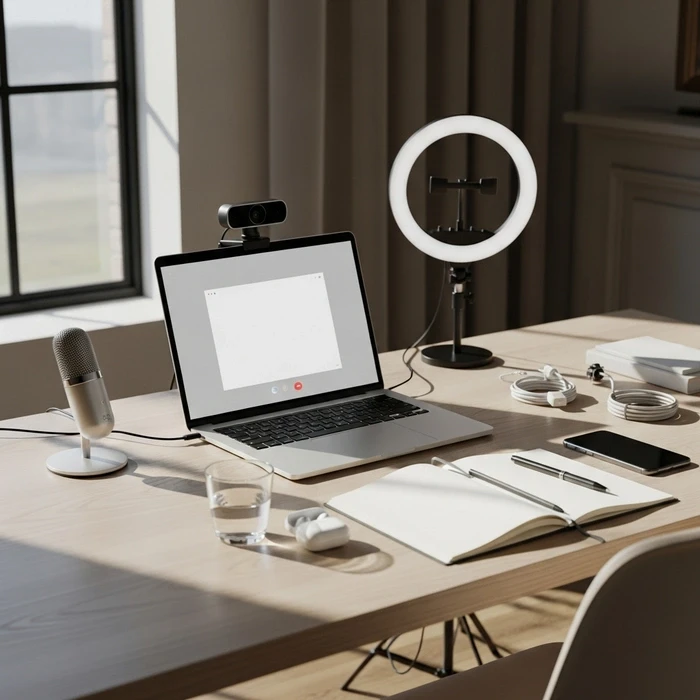
Specify camera framing standards in your briefing: eyes in the upper third of the frame, neutral or branded background, no backlight from windows. For optimal lighting at home/office, recommend a front-facing ring light or a desk lamp positioned at 45 degrees. Poor lighting makes even a CEO look unprofessional when projected on a venue screen.
Mic Selection and Audio Clarity
Laptop microphones are not acceptable for corporate conferences. Recommend a USB condenser mic or a quality lapel mic. Mic selection directly impacts audience retention. Remote attendees consistently drop off within 60 seconds of poor audio. Test for echo cancellation during rehearsal. These speaker tech requirements are non-negotiable for professional output.
Backup Dial-In and Redundancy
Every remote speaker must receive a backup dial-in number or secondary platform link. If their primary connection fails, your production team should switch to a phone bridge within 30 seconds. Document this fallback clearly in the briefing template.
Building a resilient hybrid event technology stack is the foundation that makes this level of redundancy possible at scale.
How Should Moderators Manage Panels With Remote and In-Person Speakers?
Moderators must follow a scripted protocol accounting for audio delay, visual transitions, and equitable speaking time between remote and in-room panelists. Without this structure, remote voices get consistently sidelined. Effective panel management hybrid execution is a discipline, not improvisation.
Moderator Script for Hybrid Events
Write a detailed moderator script hybrid event document. Include introduction cues, question routing order, and hard time limits per panelist. The script should instruct the moderator to always address the remote speaker by name before posing a question. This verbal cue signals the production team to switch the camera feed seamlessly.
Panel Latency Management
Audio delay between remote and in-room speakers typically ranges from 200ms to 800ms on commercial platforms. That gap is enough to cause crosstalk. Train your moderators to pause two full seconds after a remote speaker finishes before prompting the next response. Panel latency management is a practiced skill. Rehearse it with your moderator before event day.
Timing Cues and Talkback Channels
Use a talkback channel—a private audio line between the moderator, producer, and speaker. This lets the producer send timing cues without the audience hearing. A simple “two minutes remaining” prompt keeps panels on track and protects your overall schedule. For detailed hybrid event run-of-show planning, build these cue points directly into the production timeline.
Flaash Expert Insight: At hybrid corporate conferences in Saudi Arabia, moderators should account for cultural protocol. Address senior speakers and government representatives first, and allow time for formal greetings—especially when royal commission or ministry officials join remotely.
What Does a Reliable Backup and Day-of Execution Plan Look Like?
Your day-of plan must include a pre-show checklist, a live troubleshooting matrix, and a post-session handoff, each owned by a named team member. Ambiguity in ownership is the top reason hybrid events break down live.
Pre-Show Technical Rundown
Sixty minutes before doors open, run a final systems check. Verify all remote speaker feeds, test slide advance (clicker vs remote control settings confirmed), check talkback channels, and ensure recording is armed. Assign one dedicated technician per remote speaker to monitor their feed throughout the entire session.
Live Troubleshooting Matrix
Build a decision tree for the three most common failures: speaker drops offline, audio feeds back, or slides freeze. For each scenario, define the corrective action, the person responsible, and the maximum response time in seconds. Keep this document printed at the production desk—never buried in a shared drive.
Q&A Handling for Remote Speakers
Route audience questions to remote speakers through the moderator, not through an open floor mic. Structured Q&A handling prevents crosstalk and gives your production team time to adjust audio levels. For large-scale events at King Abdullah Financial District venues in Riyadh, pre-screen questions via a digital platform and display them on the speaker’s confidence monitor.
Following accessible presentation guidelines ensures your Q&A flow also serves attendees with accessibility requirements—a growing compliance expectation across KSA corporate events.
Practical Checklist: Remote Speaker Setup Before Event Week
Use this short operational checklist with every presenter:
Confirm session title, timing, and timezone in AST
Share the speaker briefing template
Collect bio, headshot, and speaker release forms
Confirm presentation format and deadline for slide collection
Review content approvals with legal or brand teams
Validate camera framing and background standards
Confirm mic selection
Run a network test
Share backup dial-in details
Book the virtual speaker rehearsal
Add the speaker to the green room process
Confirm who controls slides: operator or speaker
Practical Checklist: Rehearsal Flow for Hybrid Conferences
For a reliable virtual speaker rehearsal, follow this order:
Confirm speaker joins from the final device and location
Check camera framing
Check lighting at home/office
Test microphone and mute/unmute behavior
Run internet stability and network test
Confirm screen share permissions
Test video playback inside slides if applicable
Review timing cues
Explain Q&A handling
Test talkback or backstage communication
Confirm backup dial-in
Rehearse intro, handoff, and exit
This same discipline applies when planning related formats such as workshops. If your event includes breakout content, this guide to hybrid workshops in Saudi Arabia is a useful companion.
Moderator and Panel Checklist for Hybrid Sessions
For better hybrid conference speaker management, moderators should keep this checklist on hand:
Introduce remote speakers by name before each question
Pause briefly to account for panel latency management
Avoid interrupting delayed responses
Keep answers time-boxed
Route all audience questions through one channel
Confirm order of speakers before panel start
Use talkback for producer instructions
Prepare a fill line if a speaker drops: “We’ll reconnect and return in a moment”
Have one backup question ready per panelist
Close with a clear summary for both room and remote audiences
If your event serves a large online audience, align speaker handling with the attendee journey as well. This article on hybrid event planning for remote attendees helps ensure both sides of the experience stay coordinated.
How Do You Standardize This Process Across Multiple KSA Events?
Create a repeatable hybrid conference speaker management playbook—stored, versioned, and improved after every event—to scale quality across your organization. One-off checklists do not survive beyond a single conference cycle.
Building Your Template Library
After each event, archive the speaker briefing template, tech spec sheet, moderator script, and troubleshooting matrix. Tag documents by event type: seminar, product launch, corporate gala, or board meeting. Over three to four events, you build an internal library that cuts preparation time significantly.
Clicker vs Operator-Controlled Advance
Standardize whether remote speakers advance their own slides or hand control to a dedicated operator. The clicker vs remote control decision depends on your platform capability and speaker comfort level. For high-stakes keynotes, always default to operator-controlled advance to prevent accidental skips or dead air.
Cross-City Coordination in KSA
Saudi Arabia’s corporate event landscape spans Riyadh, Jeddah, NEOM, and the Eastern Province. Each city presents different venue AV standards and internet infrastructure. When planning hybrid corporate conferences in Saudi Arabia, audit each venue’s tech specs independently. Never assume consistency between locations.
Flaash Expert Insight: For recurring quarterly conferences across Saudi cities, create a venue-specific tech profile for each location you use. Document internet speeds, AV patch panel locations, and onsite technician contacts. This profile alone saves hours of re-discovery every cycle.
Your hybrid conference speaker management process is only as strong as its weakest link—and that link is almost always the step you skipped in rehearsal. Build the checklist. Run the rehearsal. Own the backup plan. That is how you protect your brand, your speakers, and your event ROI every single time.
Flaash helps corporate teams across the Middle East source and book venues built for hybrid execution. Start planning your next event at flaash.ae.
FAQ: remote speaker checklist for hybrid conference
What is a remote speaker checklist for hybrid conference in KSA?
A remote speaker checklist for hybrid conference is a short, actionable list that ensures remote presenters can join, present, and interact reliably with both virtual and in-room audiences. Key items include confirmed AST timing, stable internet, quality audio and video, lighting and background, presentation files, rehearsal, on-site contact, and backups.
How should remote speakers test internet and platform readiness for a hybrid conference?
Test 48–72 hours before the event using the exact platform. Aim for at least 5–10 Mbps upload and download, and prefer wired Ethernet. Run a live call with screen sharing, record a short clip, verify firewall or VPN restrictions, and keep a mobile hotspot or local ISP backup ready.
What AV equipment and settings should remote speakers use?
Remote speakers should use a 1080p webcam, a USB or XLR microphone or quality headset, and front-facing soft lighting. Place the camera at eye level, use a neutral background, test echo and monitoring, and if possible use a second screen to follow the moderator or audience feed.
How should speakers prepare slides and media for a hybrid conference?
Provide slides in PPTX and PDF, embed fonts, and include presenter notes if needed. Upload final files to the organizer’s system, keep a local copy, and test all media such as MP4 videos in advance. Share backup access to slides at least 24 hours before the session.
When should remote speakers schedule rehearsals and who should they coordinate with on-site in Saudi Arabia?
Schedule a technical rehearsal 2–7 days before the event, then run a final check 30–60 minutes before going live. Speakers should coordinate with the on-site AV or production contact and the moderator, confirm all timing in AST, and account for Saudi event scheduling needs.
What cultural, privacy, and legal considerations should remote speakers follow in Saudi corporate events?
Speakers should dress professionally, respect local cultural norms, and avoid sensitive topics unless approved. They should also confirm consent for recording, handle attendee data carefully, align with Saudi privacy expectations such as PDPL, and prepare Arabic support or captions when relevant.



Recent Posts


Load More Blogs