
-
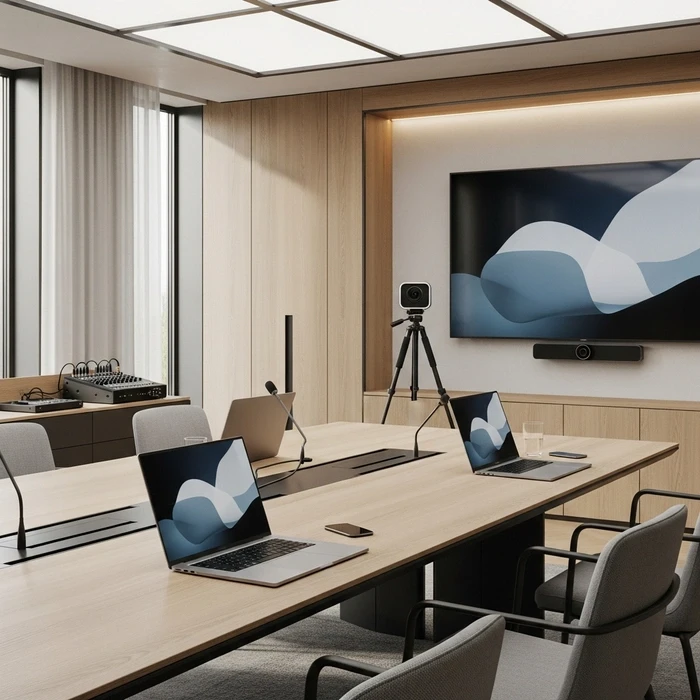
A flawless in-room experience means nothing if remote attendees see a frozen frame and hear unclear audio. That scenario still happens at corporate events more often than it should. In most cases, the problem is not one piece of equipment. It is a planning gap between venue infrastructure, AV production, and internet reliability.
For companies hosting events in Saudi Arabia, a dependable hybrid conference streaming setup is now a business requirement, not a nice-to-have. Whether you are managing a leadership summit in Riyadh, a client event in Jeddah, or a training conference in the Eastern Province, remote participants expect the same professionalism as those in the room.
This guide explains how to plan and execute a reliable hybrid conference streaming setup for KSA venues. It covers practical decisions around cameras, microphones, switchers, encoders, internet redundancy, monitoring, recording, interpretation, and rehearsals, with a clear focus on what works in real corporate venues across Saudi Arabia.
Why hybrid conference streaming setup matters in KSA venues
Saudi Arabia has become one of the region’s most active markets for conferences, internal corporate gatherings, product launches, forums, and executive meetings. Many of these events now need to serve both an in-person audience and remote participants across multiple offices, countries, or time zones.
That changes the production standard. A simple ballroom AV package is rarely enough. Your hybrid conference streaming setup needs to support:
Large ballroom layouts
Arabic and English presentations
Multiple speakers and panel discussions
VIP or closed-door sessions
Branded enterprise-level delivery
Reliable streaming for remote teams, partners, and stakeholders
For event managers, office managers, communications teams, and HR teams, the goal is simple: create one event experience that works well for both audiences.
If you are planning the event from the venue stage upward, it also helps to review the broader hybrid corporate event planning process early.
Start with venue realities, not just equipment lists
A good hybrid event production setup starts with the venue itself. In KSA, many conference venues are hotel ballrooms or multi-use event halls. These can look impressive, but they often create technical challenges.










Common venue challenges in Saudi Arabia
Typical issues include:
Deep stages that require longer camera lenses
Pillars or chandeliers that affect sightlines
Warm ballroom lighting that does not look good on camera
Shared venue internet that is not suitable for streaming
Limited cable paths between stage and control positions
House AV systems designed for in-room sound, not broadcast-quality streaming
This is why site inspection is essential. Never assume the venue’s standard setup will support a smooth livestream setup corporate conference workflow.
At Flaash, one of the biggest advantages for corporate teams is being able to compare venue options with hybrid requirements in mind. As a free platform for companies sourcing corporate event venues in Saudi Arabia and across the Middle East, Flaash helps teams shortlist spaces that are more likely to support serious hybrid production needs.
For a broader regional perspective, see hybrid corporate conferences in Saudi Arabia.
Plan the signal flow before event day
Before discussing gear, define your signal flow. This means mapping how video, audio, slides, interpretation feeds, and return feeds move from source to destination.
A standard hybrid conference streaming setup usually includes:
Cameras capturing stage and audience angles
Presentation laptops feeding slides into the switcher
Microphones feeding the audio console
A switcher combining video sources
An encoder sending the program feed to the streaming platform
A recording path for backup and post-event use
Confidence monitors for speakers
IFB or comms for presenter and production cues
A primary and backup internet path
When this flow is not designed in advance, teams end up solving problems live during the event. That is where quality drops and stress rises.
Camera setup for conferences in KSA ballrooms
Your camera setup for conferences should match the room, the agenda, and the audience expectations.
Minimum recommended camera setup
For most corporate conferences in Saudi Arabia, a practical baseline is three cameras:
1. Wide master shot
Placed at the back of the room, this captures the full stage. It is your safety shot and helps maintain continuity during transitions.
2. Tight speaker shot
Positioned slightly off-center, this camera captures close-ups of presenters, moderators, and panelists.
3. Slides or side angle camera
This can be used for audience reaction, panel coverage, side-stage shots, or content capture if the presentation visuals are part of the story.
For higher-profile events, add:
A fourth camera for roaming or audience Q&A
A dedicated feed for IMAG or side screens
A dedicated source for sponsor or branded content playback
Camera choices and positioning
In large KSA ballrooms, distance matters. Deep rooms often require stronger zoom range than teams initially expect. During the site inspection, confirm:
Camera-to-stage distance
Obstructions such as pillars or décor
Front-of-house space for tripod positions
Power availability near camera placements
Safe cable routes for SDI or HDMI
Tripods with fluid heads are the standard for stable movement. For executive or VIP events, clean and steady framing matters more than overly cinematic movement.
Audio for hybrid conference success
If video quality is slightly imperfect, remote attendees may tolerate it. If audio is poor, they leave. That is why audio for hybrid conference planning deserves extra attention.
Separate the room mix from the stream mix
The biggest mistake in hybrid events is using the exact same audio mix for the ballroom and the livestream. In-room sound reinforcement and stream audio need different treatment.
The room mix is designed for the people physically present. The stream mix is designed for headphones, laptops, and remote listeners. These are not the same listening environments.
A strong setup includes:
Main FOH mix for the room
Dedicated broadcast or stream mix
Clean feed to the encoder
Proper gain structure and monitoring throughout
Recommended microphones
For most corporate conferences, use:
Lapel mics for keynote speakers
Handheld wireless mics for Q&A
Gooseneck podium mics for lecterns
Table mics or individual wireless mics for panel discussions
Avoid relying on distant room microphones for your main stream audio. They pick up too much room sound and reduce intelligibility.
Mix-minus, IFB, and interpretation
If remote speakers are joining the session, a mix-minus feed is essential. This allows them to hear the event without hearing their own voice looped back.
If presenters need cues from production, IFB can help moderators or keynote speakers stay on time and aligned with the run of show.
For Arabic/English events, interpretation may also be part of the setup. In that case, plan separate language feeds clearly. This is especially important for enterprise events, public-sector forums, and executive sessions with bilingual audiences.
Encoding and switching for live events
Once your cameras and audio sources are ready, the next step is encoding and switching for live events.
The role of the switcher
The switcher is where all live video sources are combined. It lets your production team move between:
Wide stage shot
Speaker close-up
Slides
Split-screen layouts
Panel views
Branded holding slides
Video playback
For corporate conferences, switching should feel smooth and deliberate. Frequent unnecessary cuts can make the stream feel chaotic. A clear shot list tied to the agenda is best.
The role of the encoder
The encoder converts the program output into a format the streaming platform can deliver online. For important corporate events, many teams prefer a hardware encoder for stability, with a software backup if needed.
A professional hybrid conference streaming setup should define in advance:
Output resolution
Bitrate
Frame rate
Audio settings
Destination platform
Backup stream path
Local recording settings
If your team is using software-based workflows, the OBS Studio Overview is a useful reference. For browser-based real-time communication, especially with remote speakers, WebRTC is also relevant.
Streaming platform and recording considerations
Not every platform fits every event. The right choice depends on audience size, engagement needs, privacy level, and enterprise IT policies.
Questions to ask before choosing a platform
Is the event public, private, or invitation-only?
Do you need audience Q&A or moderated chat?
Are remote speakers joining live?
Does the client require registration or analytics?
Do you need bilingual audio channels?
Is post-event on-demand replay required?
The platform should be confirmed early so your encoder settings, test streams, and moderation workflow can be aligned before show day.
Always record the program
Every serious hybrid event production setup should include backup recording. Ideally, record in at least two places:
Main program recording from the encoder or switcher
Independent backup recording on another device
This protects you in case of a platform issue and gives the client usable content afterward.
Internet requirements for livestream in Saudi venues
Your internet requirements for livestream are one of the most important parts of the event. Yet this is still where many hybrid productions fail.
Never depend on standard venue Wi-Fi
Hotel or venue Wi-Fi is rarely suitable for a mission-critical stream. It is often shared with guests, staff operations, and other events. Even if the speed looks acceptable in a quick test, it may not remain stable during the event.
For a reliable hybrid conference streaming setup, ask for:
Dedicated wired internet
Confirmed upload speed
Access to the venue IT contact
Open ports if required by your platform
Technical confirmation in writing before event day
Primary and backup internet
A proper plan includes primary and backup internet paths.
Best practice:
Primary uplink: dedicated wired connection
Backup uplink: separate ISP line or bonded cellular
Clear failover process if the primary line drops
Redundant connectivity for events
Redundant connectivity for events is not optional for executive or customer-facing conferences. It protects the stream from outages, unstable venue infrastructure, or sudden bandwidth drops.
A common KSA-ready setup includes:
Dedicated fiber or wired venue line
5G or LTE bonded cellular backup
Pre-tested failover routing
Monitoring of upload stability and latency
If your event includes remote interaction, latency should be tested with the actual platform and actual venue network, not just estimated.
Stage lighting and confidence monitors
Visual clarity is not only about cameras. Lighting and presenter support also matter.
Stage lighting
Ballroom lighting often looks polished to the eye but poor on camera. Warm ambient light can create shadows, uneven skin tones, and low-contrast images.
For hybrid events, build a simple camera-friendly stage lighting plan with:
Balanced front light
Controlled color temperature
Consistent presenter coverage
Reduced spill onto projection screens if used
Good stage lighting improves both the room feel and the streamed image.
Confidence monitors
Confidence monitors help speakers see what they need without turning around or breaking flow. Depending on the event, this may include:
Presentation slides
Speaker notes
Countdown timer
Program return
Video call return for remote guests
They are especially useful in bilingual events, multi-speaker conferences, and sessions with tight timing.
Technical rehearsals and site inspection are non-negotiable
A polished stream is built before the audience arrives.
Site inspection checklist
During the site inspection, confirm:
Ballroom layout and stage dimensions
Camera sightlines
Audio console access
Available power
Screen and projector placement
Internet drops and IT constraints
Lighting control options
Interpreter booth or audio feed needs
FOH and backstage working areas
Take photos, measurements, and notes. Build these into your tech rider so all partners are aligned.
Technical rehearsal checklist
Schedule a full technical rehearsal whenever possible. Test:
All microphones
All camera angles
Slide switching
Remote speaker connections
Mix-minus routing
Stream output
Backup recording
Confidence monitors
Timing transitions
Backup internet failover
This is also the time to verify bilingual flow, panel handoffs, and any VIP protocol.
For operational planning, your AV team should be aligned with the event timeline. This is where a structured hybrid event run of show becomes essential.
Practical hybrid event AV checklist
Here is a working hybrid event AV checklist for corporate conferences in KSA.
Venue and infrastructure
Venue floor plan reviewed
Site inspection completed
Dedicated production power confirmed
Primary wired internet confirmed
Backup internet arranged
IT contact assigned
Ballroom lighting controls verified
Video
Camera plan approved
Tripods and lenses matched to room depth
Switcher configured
Slide input tested
Graphics and holding slides loaded
All video outputs labeled
Audio
Microphone plan approved
FOH and stream mix separated
Interpretation feeds planned if needed
Mix-minus tested for remote guests
IFB tested for presenters or moderators
Audio monitoring active at control position
Streaming and recording
Encoder settings approved
Streaming destination tested
Backup stream path available
Main recording enabled
Backup recording enabled
Stream delay and latency reviewed
Presenter experience
Confidence monitors working
Timer visible
Speaker cues confirmed
Bilingual slide flow checked
VIP session permissions confirmed
Rehearsal and final checks
Full technical rehearsal completed
Run of show signed off
Tech rider shared with all suppliers
Backup contacts assigned
Internet failover tested
Final go-live checklist completed
You can also complement this with a more audience-facing hybrid event checklist for remote attendees.
Choosing the right venue for a hybrid conference in KSA
Even the best production team can be limited by the wrong venue. When comparing spaces, ask practical questions early:
Can the venue support a dedicated streaming uplink?
Is there enough space for camera positions and FOH control?
Does the ballroom layout support clear sightlines?
Can stage lighting be adjusted for broadcast?
Is there space for interpretation or remote speaker support?
Are VIP rooms or breakout spaces available if needed?
This is where venue sourcing becomes part of the production strategy. Flaash helps companies find suitable corporate venues across Saudi Arabia, the UAE, Qatar, and the wider Middle East, with tailored proposals and no cost for the user. For busy event managers, office managers, communications teams, and HR teams, that can save significant time when hybrid requirements are part of the brief.
Conclusion
A successful hybrid conference streaming setup in Saudi Arabia depends on more than good equipment. It requires venue-aware planning, clear signal flow, reliable audio, smart camera placement, solid encoding and switching for live events, and true redundant connectivity for events.
In KSA, where corporate expectations are high and events often involve bilingual content, multiple speakers, and executive-level visibility, details matter. Start with a proper site inspection, build a realistic tech rider, test your primary and backup internet, and run a full rehearsal before show day.
If you are planning a hybrid corporate event and need a venue that can support strong production standards, Flaash can help you find the right options across Saudi Arabia and the Middle East, free of charge.
FAQ: hybrid conference streaming setup
What is a hybrid conference streaming setup?
A hybrid conference streaming setup is the combined AV, network and production workflow that enables a corporate event to run simultaneously for in-person attendees at a KSA venue and remote viewers online. It typically includes cameras, microphones, video/audio routing and mixing, an encoder or streaming appliance, a streaming platform/CDN, and on-site technical staff to manage the live feed and audience interaction.
What AV equipment is essential for corporate hybrid conferences in KSA venues?
Essential gear: at least one dedicated video encoder, 2–4 cameras, a camera switcher, wired lavalier and boundary or shotgun microphones, a digital audio mixer, professional lighting, confidence monitors, and a reliable network router with failover. Many Saudi venues have built-in systems, but you should verify compatibility and spare channels.
How do I design internet redundancy to avoid streaming failure in Saudi Arabia venues?
Use dual-path connectivity: a primary wired ISP plus a secondary path such as a different ISP or bonded cellular. Implement hardware failover on the router, prebook bandwidth with the venue, test upload speed and latency, and keep a mobile bonded kit as an immediate backup.
How many cameras and which camera types are recommended for a professional hybrid event?
For corporate conferences, 2–3 cameras work for small to medium events, while 4 or more are better for large or multi-stage productions. A typical setup includes a wide audience shot, a presenter close-up, and a dedicated slide or side angle feed. PTZs help in tight spaces, while operator-controlled broadcast cameras offer higher production quality.
What audio best practices keep remote attendees engaged?
Prioritize clear presenter audio with lavalier microphones, handhelds for Q&A, and proper routing through a digital mixer. Send a clean feed to the encoder, monitor levels continuously, and record a backup. Separate the room mix from the stream mix so remote attendees hear a clearer, more controlled signal.
How important are rehearsals and what should a technical run-through cover?
Rehearsals are essential. A full technical run-through should cover camera framing, slide playback, microphone checks, encoder and stream health, network failover, presenter cues, remote speaker connections, and emergency backup procedures. It helps the crew solve issues before the audience joins.

Recent Posts


Load More Blogs